
NeoPixel
Drive a WS2812 / SK6812 RGB LED strip with animated patterns.
APIs used: neopixel
Hardware
- Any ESP32 board
- A NeoPixel-compatible LED strip (WS2812 or SK6812)
- USB-C cable
Wiring diagram
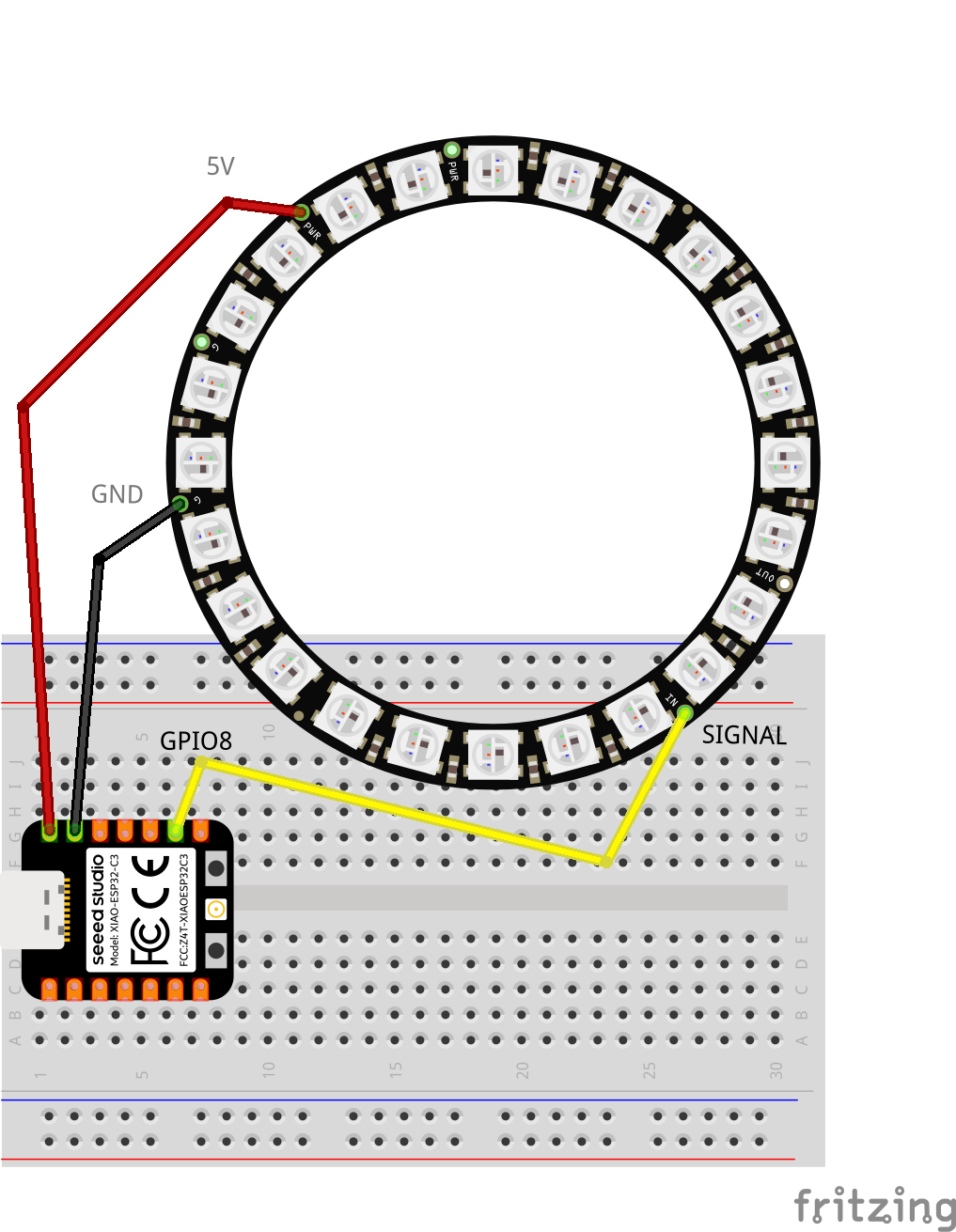
Connect the LED strip's data-in wire to GPIO 8 (or change PIN in the code). Connect the strip's VCC to 5V and GND to GND. For long strips (>8 LEDs), power the strip from an external 5V supply, not the board's USB power.
Code
import {NeoPixel} from 'mikrojs/neopixel'
import {sleep} from 'mikrojs/sleep'

const PIN = 8
const NUM_LEDS = 24
const BRIGHTNESS = 1
const PATTERN_DURATION = 8000

const strip = new NeoPixel(PIN, {count: NUM_LEDS})

// Define your patterns as async functions
// Each pattern animates the strip for PATTERN_DURATION ms

while (true) {
  // Rainbow cycle
  for (let t = 0; t < PATTERN_DURATION; t += 20) {
    for (let i = 0; i < NUM_LEDS; i++) {
      const hue = ((i / NUM_LEDS) * 360 + t * 0.1) % 360
      strip.setPixel(i, hsvToRgb(hue, 1, BRIGHTNESS)).orPanic('setPixel failed')
    }
    ;(await strip.show()).orPanic('show failed')
    await sleep(20)
  }
}
The full example in the repository includes multiple patterns: rainbow, comet, breathe, sparkle, and color wipe. Each pattern is a separate module that takes the strip, LED count, brightness, and duration as parameters.
Key concepts
new NeoPixel(pin, {count}): creates a strip controller on the given GPIO pin.strip.setPixel(index, [r, g, b]): sets a pixel's color. Returns aResult.strip.fill([r, g, b]): sets all pixels to the same color.strip.show(): pushes the pixel buffer to the hardware. Returns aPromise<Result>.strip.clear(): turns off all pixels (sets to black).strip.end(): releases the hardware resources.
All methods that can fail return a Result, so you can use .orPanic() for quick prototyping or check .ok for production code.
Run it
npx mikro dev
The LED strip will cycle through animated patterns, each lasting 8 seconds.
NeoPixel is a registered trademark of Adafruit Industries.